
Using Order
Overview
In Duett Økonomi, the order system is built as a workflow. You can place orders as an offer, started order, or an order ready for invoicing. It is also possible to enter a credit note.
The order’s position in the workflow is determined by the "status" field. The "saved" status indicates a started order, which may require manual information entry. Once the manual data is added, the status changes to "orderReadyToSend." The "orderReadyToSend" status means that the order is ready for invoicing, and typically no further changes are necessary.
An order must meet certain requirements:
- It must have at least one line.
- It must be connected to an existing customer.
- It must only contain articles that exist in Duett Økonomi.
If directInvoicing is set to true, then the order is invoiced and the order is returnes with the invoice attached to it.
In practice, an order can be created with a single text line, and additional lines (e.g., goods) can be added later before the order reaches the "orderReadyToSend" status.
Example of a simple order:
                    {
                        "config": {
                            "directInvoicing": true,
                            "styleSheetId": 14,
                            "sendMethod": "print"
                        },
                        "customerId": 1272,
                        "deliveryAddress": "Elvestranda 2\\n0464 Stavgrunn",
                        "deliveryDate": "2023-08-14T00:00:00",
                        "discountType": "percent",
                        "dueDate": "2023-09-14T00:00:00",
                        "internalReference": "#518",
                        "invoiceNote": "This is a note",
                        "invoiceYear": 2023,
                        "orderCategory": "order",
                        "orderDate": "2023-08-07T00:00:00",
                        "orderReference": "4974",
                        "orderType": "normal",
                        "ourReference": "Oskar Berntsen",
                        "payType": "invoice",
                        "status": "saved",
                        "orderLines": [
                            {
                                "name": "This is an text line in order",
                                "lineType": "text"
                            },
                            {
                                "articleId": 176,
                                "countAgreed": 1,
                                "discountValue": 0,
                                "lineType": "normal",
                                "name": "Item 1",
                                "salesPrice": 80.00,
                                "taxSaleId": "vat"
                            },
                            {
                                "articleId": 712,
                                "countAgreed": 4,
                                "discountValue": 10,
                                "//lineType": "This is inherited from article type",
                                "//name": "This line use the default articel name from Article",
                                "//salesPrice": "This line uses the sales price from the article",
                                "taxSaleId": "low"
                            },
                            {
                                "name": "This is an summation line in order",
                                "lineType": "sum"
                            },
                            {
                                "articleId": 6543,
                                "countAgreed": 4,
                                "discountValue": 0,
                                "lineType": "normal",
                                "name": "Item 3",
                                "serialNumbers": [
                                    {
                                        "orderLineId": 3,
                                        "serialNo": "0090267146605"
                                    },
                                    {
                                        "orderLineId": 3,
                                        "serialNo": "0045980271702"
                                    },
                                    {
                                        "orderLineId": 3,
                                        "serialNo": "0065379682608"
                                    },
                                    {
                                        "orderLineId": 3,
                                        "serialNo": "0048010877813"
                                    }
                                ],
                                "taxSaleId": "vat"
                            },
                            {
                                "name": "This is an summation line in order",
                                "lineType": "sum"
                            }
                        ]
                    }
About the Duett Økonomi "Invoice Center"
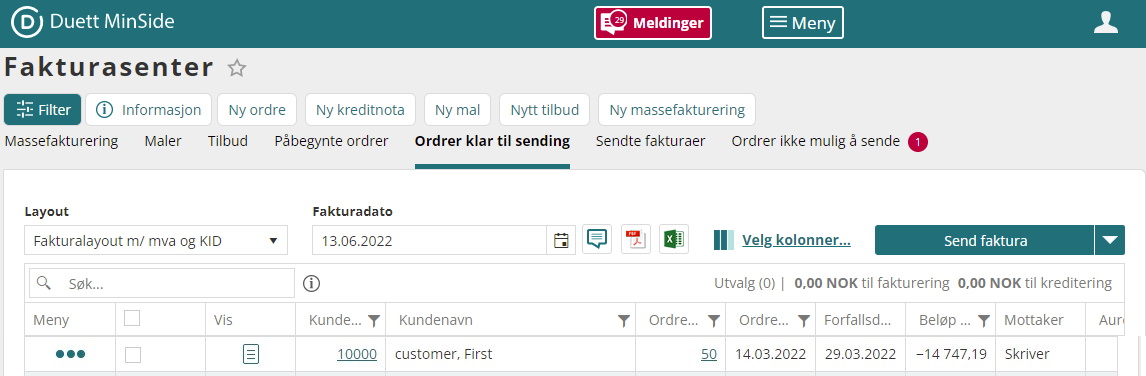
The Invoice Center provides an overview of most things that are invoice related in Duett Min Side.The screen is divided into up to 6 sheet tabs: Mass invoicing, Templates, Offers, Started orders (status= normal), Orders ready to be sent (status= transferred), Sent invoices, and Orders not possible to send. Each tab contains a table listing of their respective contents.
| This is only used when the order should be invoiced—and optionally shipped—immediately. The order will then be returned with a PDF invoice attached. | |||
| Property | Description | Default | Create |
|---|---|---|---|
| directInvoicing | optional: If directInvoicing is set to true, the order will be invoiced immediately. | false | X |
| styleSheetId | controls which layout will be used in direct invoice. Leave this null if the standard layout is to be used. When the order is invoiced, the invoice/credit note will be attached to the order. To get ids: /Register/v2/GetEDIStyleSheet?filter[stylesheetType][eq]=invoice |
null | X |
| sendMethod | Overrides the sendMethod on customer. Please refer to the customer documentation for information on invoiceSendOption. | autoTrans | X |
| Property | Description | Default | Create |
|---|---|---|---|
| attachment | See the "Attachment" table below. | X | |
| carriers | List of carriers associated with this order. | X | |
| config | Optional. If directInvoicing is true, the order is invoiced immediately. styleSheetId controls the invoice layout; leave null to use the default layout. The invoice/credit note is attached to the order upon invoicing. |
X | |
| contractReference | Reference to the contract related to this order. | X | |
| currencyCodeReference | Currency code for the amount, if not NOK. | X | |
| currencyConversionRate | Conversion rate from NOK to the specified currency. | 1 | X |
| customerId | Required. Customer ID linked to this order. | X | |
| deliveryAddress | Address for delivery. Example: "Daldata AS\r\nElvegata 3\r\n2560 ALVDAL" | X | |
| deliveryDate | Date the order is delivered. Format: Date only. | ||
| discountType | Enum: percent, amount. |
Customer’s discount type. Defaults to percent if not set. |
X |
| dueDate | Date the payment is due. Format: Date only. | X | |
| internalReference | Your internal reference for this order. | X | |
| invoiceAddress | Invoice recipient address. Example: "Daldata AS\r\nElvegata 3\r\n2560 ALVDAL" | Customer’s default invoice address. | X |
| invoiceNote | Additional note printed on the invoice. | X | |
| invoiceNumber | Invoice number associated with this order. | ||
| invoiceYear | Required. Financial year this invoice belongs to. | X | |
| number | Autogenerated order number. Resets to 1 each year. Unique key: orderNumber + year. |
||
| orderCategory | Required. Enum: order, offer. |
X | |
| orderDate | Required. Date the order was created. Format: Date only. | X | |
| orderLines | See the "Order Line" table below. | X | |
| orderReference | External order reference. | X | |
| orderType | Enum: normal, credit, project, hour, offer. Note: project and hour are outgoing only. |
X | |
| ourReference | Required. Internal reference used by us for this order. | X | |
| payDays | Payment deadline in days. If left empty, the default from the customer is used. | Customer’s default value (see "Kredittid" under "Fakturering" in DuettWeb or DuettWin). Defaults to 10 if unavailable. | X |
| payType | Required. Payment method. Enum: cash, invoice, autoPay, payCard, creditCard, currency. See PayType table for details. |
X | |
| status | Required. Enum: saved, orderReadyToSend. Offers can only use saved.Possible states on fetch: Saved, OrderPrepared, OrderReadyToSend, InvoiceSent, InvoicePaymentProposal, InvoiceBooked, InvoicePreBooked, OfferDeleted, OfferRejected, OfferTransferredToOrder, OfferAccepted, OfferSent, OfferReceived, OfferSettled, Delivered, ToRequest. |
X | |
| yourDepartmentReference | Your department’s reference. | X | |
| yourProjectReference | Your project reference. | X | |
| yourReference | Your personal reference. | X |
| Property | Description | Default Value | Create |
|---|---|---|---|
| articleId | The article id used by this order line. | X | |
| calcAmount | Sum per line before one has taken into account whether the prices of the client are stated as net or gross. DuettAPI will automatically calculate this from the salesPrice, countAgreed, countDimension and discountAmount. | ||
| carriers | A list of carriers tied to this order line | X | |
| countAgreed | Agreed quantity of the article | X | |
| countDimension | Dimension. This is a multiplier that is set on the total sum per line. | 1 | X |
| deliveryDate | The date this order is delivered | ||
| discountAmount | The total discount amount. DuettAPI will automatically calculate this from the discountType, discountValue, countAgreed, countDimension and salesPrice. | ||
| discountValue | The value of the discount. Percentage if discountType is percent, or an amount if discountType is amount. If a value of discountType amount exceeds the salesPrice it is reduced to be equal to the salesPrice. | 0 | X |
| grossAmount | The total amount including VAT. DuettAPI will automatically calculate this from the calcAmount and vatAmount. | ||
| key | Article number. | Default value is inherited from article via articleId. | |
| lineType | Enum: normal (ArticleType = normal), amount (ArticleType = amount), serial (ArticleType = serial). | Default value is inherited from article via articleId. | X |
| masterLineId | Reference to other order line ids. To support secondary articles (eg.: serial articles). | X | |
| name | Article name, or text line text. This text can override the article name | Default value is inherited from article via articleId. | X |
| netAmount | The total amount excluding VAT. DuettAPI will automatically calculate this from the calcAmount and vatAmount. | ||
| netCoverage | Net coverage (NOK 150 net in purchases, sold for 200 net, gives NOK 50 net "plus" => coverage) | ||
| salesPrice | Sales price of individual articles. In Duett Økonomi it is the "Salgspris 1" field. | Default value is inherited from article via articleId. | X |
| serialNumbers | List of serial numbers tied to this order if serial number articles are used. Required when OrderLineType = serial. | X | |
| taxSaleId | Enum: vat, noVat, abroad, food, low, vat_Abroad, food_Abroad, noVat_Abroad, noVat_Reverse, vat_Reverse, nodeductable_Reverse. See documentation here | Default value is inherited from article via articleId. | X |
| unit | The unit to measure this article if applicable. | Default value is inherited from article via articleId. | X |
| unitCostPrice | The cost per unit | ||
| vatAmount | The total amount of the VAT. DuettAPI will automatically calculate this from the salesPrice and taxSaleId |
| Property | Description | Default Value | Create |
|---|---|---|---|
| lineType | text | X | |
| name | Text line text. | X |
| Property | Description | Default Value | Create |
|---|---|---|---|
| lineType | sum | X | |
| name | Text description for sum. | X | |
| calcAmount | Sum value of articles entered on order lines above this line and after the last sum line. This is automatically calculated. |
| Property | Description | Default | Create |
|---|---|---|---|
| id | Required. The article this hour registration is tied to | ||
| date | date time value | ||
| description | Description of the attachment | X | |
| filename | File name of the attachment | X | |
| type | The file extension e.g. PDF, JPG | ||
| value | The file data in Byte[] | X |
| Property | Description |
|---|---|
| cash | (Applies only if you use an Invoice or Order). When registering cash as a form of payment, when saving an order, you will immediately be asked if an invoice should be printed. |
| autoPay | (Applies only if one uses a payment intermediary, possibly in combination with an invoice/order). Here, the customer will be automatically charged when due. The customer must receive information about the move in advance. NB! Can only be used against business customers. |
| invoice | (Applies only if you use an Invoice or Order). Works like autoPay - but the invoice will be printed on a form suitable for a pre-printed postal collection form. In accounting, this is treated as a credit sale. |
| payCard | (Applies only if you use an Invoice or Order). Works the same as cash, but when posting such invoices, the amount will not be posted to the cash account - but to the payment card account. |
| creditCard | (Applies only if you use an Invoice or Order). Works the same as cash, but when posting such invoices, the amount will not be posted to the cash account - but to the credit card account. |
| currency | Used if the customer is registered as a foreign customer. |